
Frequently Asked Questions (FAQs)
ULEARN FAQs
This guide is designed to help you navigate the Ulearn platform. We have grouped the most common questions into clear categories, with step-by-step answers and helpful tips. For quick access, use the collapsible sections below to expand only what you need. Whether you're a new learner or returning participant, this page is your go-to support hub.
🔐 ACCESS & NAVIGATION
A. How to register for a course on Ulearn - First time users
- In your browser type in ulearn4u.net
- If you have never accessed the system, click on login and choose create an account.
- Enter your details (username in small letters, password, first name, last name, city/district, institution). You will get a message requesting you to confirm your email address.
- Go to your email address, the one you used in the registration and click on the confirmation link.
- Login with your username/email and password.
- Under Available Courses click on the course you are undertaking.
- Choose enroll for course. That's it!
B. Forgotten password? How to login (for existing Ulearn users)
- In your browser type in ulearn4u.net
- Click on the Login button in the top right corner
- Select lost password.
- Under search by email address, type in your email address.
- Complete the I am not a robot check and Search.
- You will get a system message requesting you to check your email for the password reset link.
- Open your email and look for the password reset message from Ulearn. Click on it.
- Enter a new password and save.
- Try to log in again with your email address as the username and new password. That's it! 💪🏽
C. How do I log in to Ulearn?
- In your browser type in ulearn4u.net
- Click on the Login button in the top right corner
- Enter your username and password
D. How do I access my course?
- In your browser type in ulearn4u.net
- Click on the Login and enter your details
- Go to “My courses” in the menu bar
E. How do I find a specific course?
Use the search bar or course categories on the homepage.
F. How do I return to the homepage?
Click on “Home” or the Ulearn site logo.
G. How do I switch between courses?
Use the “My courses” menu.
H. Can I access Ulearn from any device?
- Yes. Ulearn is web based and works on desktops, tablets, and smartphones.
- For best experience, use modern browsers (Chrome, Edge, Safari).
I. Do I need to be tech savvy?
No. Basic internet skills are enough. Support is available if needed.
J. Can I access Ulearn without the internet?
No. Ulearn requires internet. The mobile app allows offline access to downloaded materials.
📚 COURSE CONTENT AND ACTIVITIES
A. Why can’t I see all modules?
The teacher may have hidden them or set restrictions.
B. How do I participate in forums/quizzes?
Click the activity link, follow instructions, and submit your response.
C. How do I edit my profile?
- Click your name (top-right corner).
- Select Profile → Edit profile.
- Update details (name, gender, institution, etc.).
- Click Update profile to save changes.
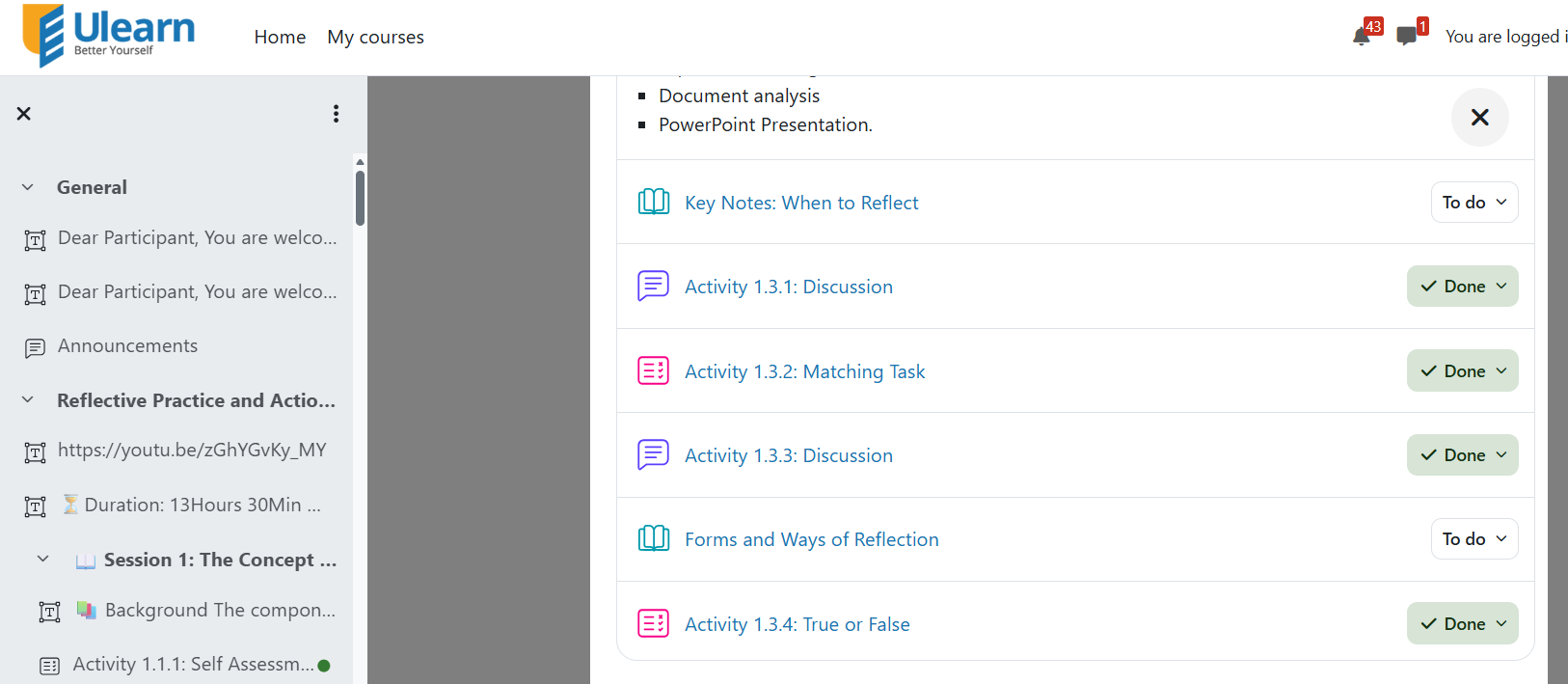
D. Where should I find my undone activities?
You can find your undone activities by looking at the checkboxes next to each activity on your course page. Any box that is marked “To Do” means the activity is not yet complete.
📝 GRADES
A. How can I see my grades?
Go to “Grades” in the navigation drawer or open the assignment to view feedback.
B. How can I get a copy of my grades?
To obtain your transcript, send your request via email to support@ulearn4u.net
📬 NOTIFICATIONS AND COMMUNICATIONS
A. I am not receiving emails from Ulearn.
Check your profile settings, spam folder, and ensure your email is verified
B. I am receiving too many emails. How do i stop this?
Adjust forum subscription ornotification preferences in your profile.
🎓 CERTIFICATION AND GRADUATION
A. When will I receive my certificate?
After completing all required activities
B. Who issues my certificate?
Ulearn, onbehalf of the Ministry of Education and Sports.
C. How do I access my certificate?
Go to your profile, click on "My Certificates" and download file. Alternatively, check your email for a completion message from Ulearn.
D. In what format do i get my certificate
Ulearn Digital PDF with QR code.
E. Does Ulearn offer physical certificates?
No. Ulearn only issues a Digital PDF format which you can print out.
F. How do I know that my certificate is valid?
Scan the QR code.
G. Can i have multiple copies of my certificate?
Absolutely. You can download as many times as needed.
I did not receive my certificate via email. What do i do?
Check spam or download directly from Ulearn.
J. Can i get my certificate before finishing?
Not possible. You must complete all course requirements to get a certificate.
K. Does my certificate expire?
Certificates remain valid until the issuing body officially shares updated course content basing on user training needs. This normally take 1 year or more.
L. Is the certificate recognised?
Yes. Your your cetificate is valid and recognized by employers and institutions.
M. Can I use my certificate when applying for jobs/studies?
Yes. It is recognized professionally and academically.
N. My name is misspelt on the certificate. What do I do?
Update your profile and request a reissue
O. Can I share it on LinkedIn?
Yes, upload the PDF or print it.
P. Shall we have a physical graduation ceremony?
No, recognition is digital only.
For further information, email support@ulearn4u.net